Dreamy Watercolor Borders: Elevating Your Digital Designs with High-Resolution Transparency
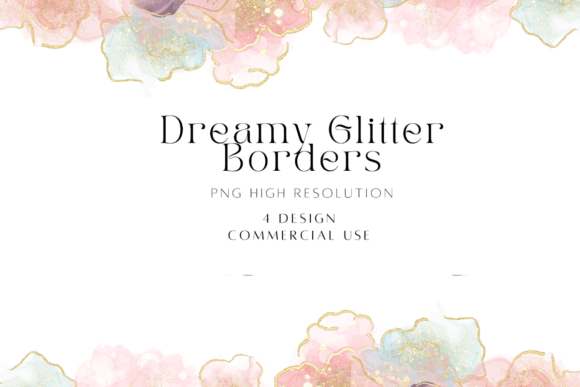
In the world of digital design, visual hierarchy and aesthetic appeal are paramount. Whether you are a seasoned graphic designer crafting a brand identity or a small business owner creating social media graphics for your boutique, the right decorative elements can make or break a composition. This is where Dreamy Watercolor Borders come into play. These assets offer a soft, artistic touch that mimics traditional painting techniques but provides the convenience and precision required in modern digital workflows. Specifically, the Dreamy Alcohol Ink Watercolor Borders Bundle represents a significant upgrade in quality, offering transparent PNG files at resolutions that ensure crisp edges and vibrant colors regardless of how you scale them.
Many creators assume that any "watercolor" image found online will suffice for their projects. However, not all digital borders are created equal. The difference between a muddy, pixelated border and a stunning, professional-grade frame often lies in the file format, resolution, and the specific technique used to generate the art—such as alcohol ink versus standard watercolor. Understanding these nuances is critical for avoiding costly reworks and ensuring your final output looks polished and intentional.
The Power of Resolution and File Format
One of the most common pitfalls when selecting digital clipart or borders is overlooking technical specifications. A beautiful image rendered at 72 DPI (dots per inch) may look fine on a website thumbnail but will appear blurry and jagged if printed on a poster or scaled up for a large banner. The Dreamy Alcohol Ink Watercolor Borders Bundle addresses this by providing two distinct size options, both captured at an impressive 400 DPI.
- 8000 x 8000 pixels: This high-resolution option is ideal for large-format printing, such as wedding invitations, gallery walls, or high-quality posters. At 400 DPI, the intricate details of the alcohol ink bleed and watercolor texture remain sharp even when viewed from close range.
- 4000 x 4000 pixels: This size is perfectly suited for web use, social media posts, and standard document layouts. It offers a balance between visual impact and file size efficiency, ensuring fast loading times without sacrificing clarity.
Furthermore, the inclusion of transparent PNG files is non-negotiable for professional results. Unlike JPEGs, which force a solid background color onto every image, PNGs allow the border to blend seamlessly with whatever background you choose. This transparency is what allows the border to act as a true frame rather than a box placed over your content. When you layer these borders over textured paper backgrounds, gradient webs, or solid colors, the edges remain clean and undistorted.
Alcohol Ink vs. Traditional Watercolor: Why It Matters
While the term "watercolor" is often used broadly, the distinction between traditional watercolor and alcohol ink effects is significant in digital art. Traditional watercolor tends to be more fluid, with softer edges and predictable pigment pooling. Alcohol ink, on the other hand, creates dynamic, cellular patterns with vibrant, saturated hues that spread unpredictably, resulting in a dreamy, ethereal look that is highly sought after in contemporary design.
Designers often mistake generic watercolor textures for alcohol ink styles, leading to a mismatch in mood. If your project requires a bold, energetic feel with high contrast, a subtle traditional watercolor might fall flat. Conversely, if you need a gentle, pastel aesthetic for a baby shower invitation, heavy alcohol ink splashes might overwhelm the text. The Dreamy Alcohol Ink Watercolor Borders bundle specifically captures that unique interplay of movement and color saturation, giving you a versatile toolset that bridges the gap between organic chaos and structured design.
Avoiding Common Application Mistakes
Even with high-quality assets, improper application can lead to subpar results. Here are practical corrections to help you maximize the utility of these borders:
- Ignoring Layer Blending Modes: Beginners often place a dark border directly over a busy background, causing visual clutter. Instead, experiment with blending modes like "Multiply" or "Overlay" in software like Photoshop or Canva. This allows the texture of the border to interact naturally with the underlying design, creating depth rather than just sitting on top of it.
- Scaling Beyond Limits: While 400 DPI is excellent, stretching a 4000px image to fit a billboard-sized canvas will still result in loss of detail. Always start with the largest available file size (8000x8000) if you plan to print, then downscale for web use. Never upscale a smaller file, as interpolation will soften the crisp edges.
- Neglecting White Space: A common error is cramming too much content inside a decorative border. Watercolor borders are designed to guide the eye, not distract from it. Ensure there is ample padding between your text or central artwork and the inner edge of the border to maintain readability and elegance.
Versatility Across Projects
The utility of Dreamy Watercolor Borders extends far beyond simple decoration. They serve multiple functional roles in design:
- Scrapbooking and Digital Journals: Use them to frame photos or journal entries, adding a personal, handcrafted feel to digital layouts.
- Print-on-Demand Products: Entrepreneurs selling mugs, t-shirts, or notebooks can use these borders as standalone patterns or framing elements. The high DPI ensures the product prints clearly, reducing return rates due to poor image quality.
- Marketing Materials: Bloggers and marketers can use these borders to create cohesive branding across Pinterest pins, Instagram stories, and email headers. Consistency in visual style builds trust and recognition.
- Educational Resources: Teachers and educators can enhance worksheets or presentation slides with these artistic touches, making learning materials more engaging for students.
Evaluating Quality Before You Buy
When evaluating bundles like the Dreamy Alcohol Ink Watercolor Borders Bundle, look beyond the preview images. Check the following criteria:
- Edge Softness: Zoom in on the corners of the PNG previews. Are the edges crisp, or do they have halos? Good transparent PNGs should have no white outlines or compression artifacts.
- Color Vibrancy: Ensure the colors are rich and not washed out. Alcohol ink styles should pop, while maintaining a sense of depth through shading.
- File Size Efficiency: High resolution does not always mean unnecessarily large file sizes. Well-optimized PNGs load quickly, which is crucial for user experience on websites.
By understanding the technical advantages of high-DPI transparent files and the aesthetic power of alcohol ink textures, you can make informed decisions that elevate your creative output. Dreamy Watercolor Borders are not just decorative add-ons; they are foundational elements that can transform mundane designs into memorable visual experiences. Take the time to integrate them thoughtfully, respecting their resolution limits and blending capabilities, and you will see a marked improvement in the professionalism and appeal of your work.