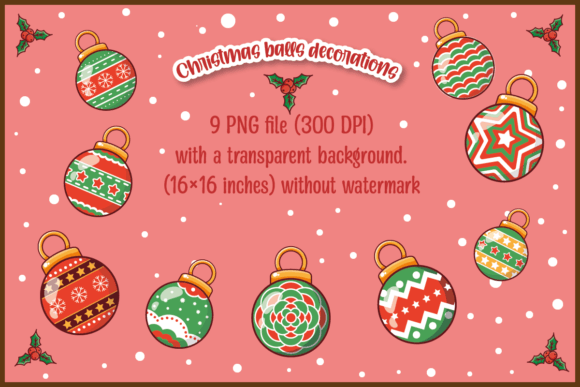
Christmas Balls Decoration: A Practical Guide to Using Digital Assets for Holiday Projects
The holiday season brings a specific kind of creative pressure. Whether you are running a small business, managing social media for a brand, or simply trying to make your home feel festive without spending hours on crafts, the demand for high-quality visual elements spikes dramatically. This is where digital resources like Christmas Balls Decoration assets become invaluable tools in your workflow. Specifically, a set containing nine distinct decorative ball designs offers a versatile foundation for everything from personal greeting cards to commercial product packaging.
Understanding what you are actually purchasing and how to implement these files correctly can save you time, prevent printing errors, and elevate the professional look of your final output. Let’s break down exactly what this resource entails, who it serves, and how to get the most out of it.
What You Are Actually Getting
Before diving into use cases, it is crucial to clarify the technical nature of the asset. When you download a package described as "9 Christmas balls decoration design PNG Files," you are receiving raster images, not vector cut files. Here is the practical reality of that distinction:
- Format: You will receive one ZIP file containing nine individual PNG (Portable Network Graphics) files.
- Resolution: Each image is 300 DPI (dots per inch). This is the gold standard for print quality. It means that when you print these images at their intended size, they will appear sharp and crisp, with no pixelation or blurriness.
- Size: The dimensions are 16×16 inches. This large physical size allows for significant flexibility. You can scale them down for small tags or keep them large for posters, provided you do not upscale them beyond their original resolution.
- Background: The transparent background is the key feature. It means the red, green, gold, or silver of the ornament stands alone against whatever canvas you place it on. You don’t have to fight white boxes or awkward edges when layering text or other graphics.
- No Watermark: The files are clean and ready for immediate use.
Please note: This is NOT an SVG cut file. If you are using a Cricut, Silhouette, or other vinyl cutting machine, these PNGs will not work directly. They are designed for printing, digital design, and graphic composition, not for physical cutting machines. Confusing these formats is a common pitfall, so ensure your project aligns with raster-based workflows.
Real-World Applications for Creators and Entrepreneurs
The versatility of a 16x16 inch, high-resolution PNG lies in its adaptability. Here is how different users can apply these Christmas Balls Decoration assets in real scenarios.
Small Business Owners and Product Packaging
If you sell handmade goods, candles, baked treats, or jewelry, holiday packaging is essential for sales. Instead of buying generic stickers, you can create custom labels that feature these ornaments. Because the images are 300 DPI, they hold up well on glossy or matte sticker paper. Imagine placing one of these high-quality balls next to your logo on a gift box. It instantly signals "holiday special" without needing complex design skills. The transparent background allows you to overlay text like "Merry Christmas" or "Happy Holidays" directly over or beside the ball, creating a cohesive brand moment.
Social Media Marketers and Bloggers
Digital content needs to pop, especially during December. For bloggers and marketers, these PNGs serve as excellent graphical elements for header images, Pinterest pins, and Instagram stories. You can drag and drop a Christmas ball into Canva, Photoshop, or any basic graphic editor. Use them to frame text quotes, decorate the corners of blog post thumbnails, or create festive banners for email newsletters. The 16x16 inch size ensures that even if you crop them tightly for a square Instagram post, the detail remains sharp.
Educators and Classroom Materials
Teachers often struggle to find age-appropriate, high-quality visuals for holiday-themed worksheets or classroom decorations. These PNGs offer a clean, classic aesthetic that works well for elementary through middle school projects. Educators can use them to create:
- Counting Worksheets: Print the balls and ask students to count them or sort them by color.
- Reading Comprehension Passages: Add the images to stories about winter traditions to aid visual learners.
- Classroom Decor: Print them on cardstock to create window clings or bulletin board accents. Since they are large (16x16), they remain visible from across the room.
Personal and Lifestyle Uses
Not everyone is selling something. Many users are hobbyists looking to add a touch of professionalism to their personal creations.
Custom Greeting Cards and Invitations
Home printers have improved significantly, but many people still rely on services like Shutterfly or Vistaprint. Having your own high-res PNGs allows you to design unique cards at home or upload custom artwork to online printers. You can arrange three or four of the Christmas balls in a cluster to create a festive border for family updates. The transparent background makes it easy to blend the ornaments into watercolor backgrounds or snowy scenes you might create digitally.
Gift Tagging and Wrapping
Store-bought gift tags often lack personality. By printing these designs on thick cardstock or label sheets, you can create bespoke tags. Cut them out and attach them to presents with twine or ribbon. The 300 DPI quality ensures that fine details—like the shine on the bauble or the texture of the cap—are preserved, making your gifts look thoughtfully curated rather than mass-produced.
Technical Considerations Before You Start
To avoid frustration, keep these practical tips in mind when working with your new Christmas Balls Decoration files.
Software Compatibility
Since these are PNGs, they work in almost any image editing software. Adobe Photoshop, Illustrator (for raster placement), GIMP, Affinity Photo, and free online editors like Canva all handle them effortlessly. If you are a beginner, start with Canva. Upload the PNG, place it on your canvas, and adjust the opacity if you want a subtle watermark effect behind text.
Printing vs. Digital Display
The 300 DPI specification is critical for print. However, if you are using these purely for web display, the file size might be larger than necessary. For web use, you can safely resize the images to 72 DPI or reduce the pixel dimensions (e.g., to 500x500 pixels) to speed up page load times. But never upscale a smaller version back to 300 DPI; it will look blurry.
Color Management
When printing, monitor settings matter. Your screen displays colors in RGB (Red, Green, Blue), while printers use CMYK (Cyan, Magenta, Yellow, Key/Black). While PNGs are typically RGB, converting them to CMYK before sending to a professional printer can prevent color shifts. If you are printing at home, stick to your printer’s default settings, as modern drivers often handle the conversion automatically.
Why This Set Works
The value of this specific set lies in its simplicity and quality. You aren’t getting a cluttered bundle of low-res clipart. You are getting nine distinct, high-fidelity representations of Christmas ornaments. This variety allows for composition flexibility. You might choose a single red ball for a minimalist design, or cluster multiple colors for a busy, festive layout. The 16x16 inch size provides ample negative space around the subject, making it easier to integrate into various design layouts without feeling cramped.
In summary, whether you are a freelancer looking to speed up client deliverables, a teacher preparing lesson plans, or a parent wanting to make memorable gifts, these PNG files offer a straightforward solution. They bridge the gap between amateur creativity and professional presentation. Just remember: check your format requirements, respect the resolution limits, and let the transparency do the heavy lifting in your design process.