30 Denim Texture Photoshop Stamp Brushes
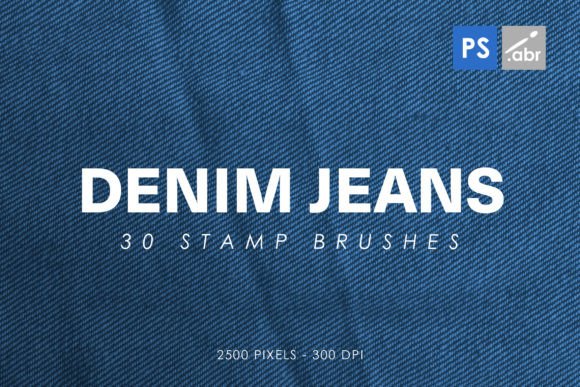
If you have ever tried to create a design that feels rugged, authentic, or distinctly "American workwear" using only standard digital tools, you know the struggle. Flat colors and smooth gradients often lack the tactile reality of real fabric. This is where 30 Denim Texture Photoshop Stamp Brushes change the game. These are not just generic noise filters; they are high-resolution, 2500-pixel stamp brushes designed to replicate the specific weave, fade, and wear patterns of actual denim.
Whether you are a graphic designer working on a brand identity for a casual clothing line, a hobbyist editing photos of your weekend adventures, or a marketer creating social media assets that need to pop with texture, these brushes offer a shortcut to professional-looking results. The set includes 30 distinct stamp brushes compatible with Photoshop CS2 through the latest Creative Cloud versions, ensuring that almost anyone with the software can access this level of detail without needing advanced 3D modeling skills.
Why Texture Matters in Digital Design
In the world of flat digital design, screens can feel sterile. Users scroll past clean, minimalist interfaces every day. To break through that visual noise, designers often turn to texture. Denim is one of the most universally recognized textures in modern culture. It signals durability, casual comfort, and timelessness. However, adding a background image of jeans is heavy, slow to load, and hard to control.
Using 30 Denim Texture Photoshop Stamp Brushes allows you to apply texture exactly where you need it. You can add subtle fading to a corner, create a worn-out edge on a text box, or overlay a rough weave pattern onto a solid color block. Because these are stamp brushes, you paint them on like any other tool in Photoshop. You control the opacity, the flow, and the layer blending modes. This gives you granular control over how "real" the texture looks, allowing you to simulate everything from brand-new, stiff indigo denim to heavily washed, soft cotton blends.
Practical Applications for Different Creators
The versatility of these brushes extends far beyond simple background filling. Here is how different types of users can integrate these tools into their daily workflows.
For Graphic Designers and Brand Identity Specialists
When designing logos, business cards, or packaging for brands that want to convey reliability or heritage, denim textures provide an immediate psychological cue. Imagine designing a label for a craft beer or a handmade leather wallet. Instead of relying on stock photography that might look cliché, you can use the stamp brushes to create custom, unique textures for your layout elements. You can create a torn-paper effect combined with denim edges, or use the brush to fill typography with a realistic fabric grain. This adds depth and tangibility to digital files before they even go to print.
For Photographers and Photo Manipulators
Photo manipulation often suffers from lighting mismatches. If you composite a person wearing jeans into a studio shot, the lighting on the fabric might not match the subject's face. By applying a 30 Denim Texture Photoshop Stamp Brush as an overlay on top of the existing photo (using Multiply or Overlay blend modes), you can instantly unify the look. The texture catches the light differently than the base image, helping to blend the composite seamlessly. It also adds micro-details—faint scratches, loose threads, and color variations—that cameras sometimes miss but our brains expect to see in close-ups.
For Social Media Marketers and Bloggers
Content creators are constantly under pressure to produce eye-catching visuals quickly. Stock images are expensive and often overused. Using these stamp brushes allows you to create original backgrounds for Instagram posts, Pinterest pins, or blog headers in seconds. You can create a series of promotional graphics for a sale event by simply varying the denim texture application. One post might feature a light-wash, airy feel, while another uses a dark, heavy indigo stamp for a more serious announcement. This variety keeps your feed looking fresh without requiring hours of editing.
For Game Developers and Digital Artists
In 2D game development or concept art, assets need to be lightweight yet detailed. High-resolution textures can bloat file sizes. A stamp brush approach allows artists to paint details directly onto sprites or UI elements. Need a character’s jacket to look worn? Stamp a few brush strokes along the elbows and shoulders. Want a crate or bag to look like it has seen better days? Use the heavier, rougher brushes from the set. This method is efficient and integrates directly into the digital painting workflow.
Technical Advantages and Compatibility
One of the strongest selling points of this specific set is its compatibility. Many older brush packs do not work well with newer versions of Photoshop, leading to frustration when trying to update software. These 30 Denim Texture Photoshop Stamp Brushes are built to work from Photoshop CS2 all the way to the current CC versions. This longevity means you can download the pack once and use it across multiple machines or projects over many years.
The 2500-pixel size is significant. In the early days of digital brushes, small sizes led to pixelation when scaled up. At 2500 pixels, these brushes retain their sharpness and detail even when used on large-format prints or high-DPI displays. This ensures that whether you are designing a mobile app icon or a billboard, the denim texture remains crisp. Furthermore, because they are high-resolution images converted into stamps, they carry less data weight than loading full-layered smart objects, keeping your Photoshop document lighter and faster.
How to Get the Most Out of the Set
Simply downloading the brushes is only half the battle. To get professional results, you need to understand how to manipulate them. Here are a few practical tips for integrating these tools effectively.
- Experiment with Blend Modes: Do not just use the Normal blend mode. Try setting the layer to Multiply to darken areas, Overlay to enhance contrast, or Soft Light for a subtle texture hint. This mimics how light interacts with real fabric.
- Vary Opacity and Flow: Real denim is not uniform. Some areas are faded, others are deep blue. Adjusting the opacity of individual brush strokes creates natural variation. Avoid pressing down with 100% opacity everywhere; instead, build up the texture gradually.
- Rotate and Scale: Fabric weaves have directionality. Rotate your brush angle to follow the grain of the cloth or the curve of the object you are texturing. Scaling the brush size helps simulate distance—a large brush stroke might represent a fold in the fabric, while a tiny one represents a single thread.
- Combine with Other Textures: Denim rarely exists in isolation. Combine these stamp brushes with leather, canvas, or paper textures. The interplay between different materials adds narrative depth to your designs.
Considerations Before You Start
While these brushes are powerful, they require a bit of artistic judgment. They are tools for enhancement, not magic wands that fix poor composition. If your underlying design is cluttered, adding denim texture will not save it. Additionally, consider the context of your project. Denim textures evoke a specific mood—casual, rugged, vintage. Using them in a corporate finance report or a medical brochure might send the wrong message. Always ask yourself if the texture supports the emotional goal of the piece.
Finally, remember that these are stamp brushes, meaning they leave a mark. They are additive. Unlike a background pattern that repeats infinitely, these brushes allow you to place texture strategically. This requires a steady hand or a willingness to undo and redo strokes until the distribution feels natural. Take your time. The best digital textures are those that look so real you forget they were made on a computer.
In summary, 30 Denim Texture Photoshop Stamp Brushes are a versatile asset for anyone looking to add grit, realism, and style to their digital creations. From enhancing photo composites to defining brand aesthetics, they bridge the gap between digital precision and analog charm. By understanding how to apply them thoughtfully, you can elevate your work from plain to polished with minimal effort.