90 Concrete Texture Photoshop Brushes
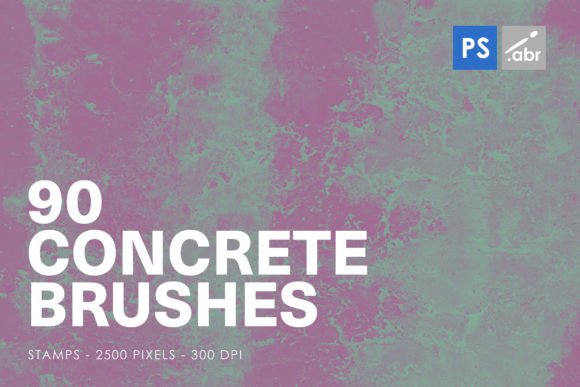
When you are looking to add a layer of gritty realism or industrial chic to your digital designs, the right tools can make all the difference. 90 Concrete Texture Photoshop Brushes offer a comprehensive toolkit for designers, artists, and photographers who want to move beyond flat colors and simple gradients. These aren't just generic noise filters; they are high-resolution images formatted as stamp brushes, specifically designed to integrate seamlessly into Adobe Photoshop workflows from CS2 through the latest Creative Cloud versions.
The set includes 90 distinct stamp brushes, each rendered at a substantial 2500 pixels in size. This resolution is critical because it ensures that when you apply these textures to large-format prints, detailed architectural visualizations, or high-definition web graphics, the concrete remains sharp and authentic without pixelation. The variety within the pack means you aren't limited to a single shade of gray or one type of surface finish. Instead, you get a diverse palette of weathered walls, smooth poured slabs, cracked pavements, and stained surfaces that mimic real-world materials.
Transforming Digital Spaces with Real-World Materials
The primary strength of this brush set lies in its ability to bridge the gap between digital creation and physical reality. In graphic design, particularly in branding and advertising, texture adds depth. A logo placed on a plain white background might feel sterile, but overlaying a subtle concrete texture can ground it, giving it an urban, modern, or rugged appeal. This is especially effective for brands in construction, automotive, fitness, or music industries where conveying strength and durability is part of the narrative.
Consider the scenario of a social media campaign for a new sneaker release. The product needs to look dynamic and grounded. By using these concrete stamp brushes, a designer can create a backdrop that looks like an actual city street or a warehouse floor. The 2500-pixel size allows for intricate details—small pits, aggregate stones, and subtle color variations—to be visible even when zoomed in. This level of detail helps the viewer subconsciously trust the image's authenticity, making the product feel more tangible.
Applications Beyond Graphic Design
While graphic designers are the most obvious users, the utility of 90 Concrete Texture Photoshop Brushes extends far beyond marketing materials. Game developers and 3D artists often struggle with creating convincing environments. While 3D modeling software has powerful rendering engines, baking in realistic textures via Photoshop can save time and add unique character to assets. These brushes can be used to paint directly onto texture maps, adding wear and tear to virtual walls, floors, and obstacles. The stamp nature of the brushes makes it easy to scatter realistic cracks or stains across a large surface area quickly, rather than painting every imperfection by hand.
Photographers and photo manipulators also find immense value in this resource. When compositing images, matching lighting and texture is essential for a believable result. If you are placing a digital object into a photograph of an abandoned building, the object will look fake if it lacks the same environmental grime and surface irregularities. Using these concrete brushes, you can paint shadows, highlights, and dirt onto the digital object to match the surrounding environment. This technique, known as texturing, is crucial for high-end visual effects work.
Interior Design and Architectural Visualization
In the realm of interior design and architecture, presentation is everything. Clients need to visualize how a space will feel before a single brick is laid. Architects and interior designers use Photoshop to create mood boards and renderings that showcase material palettes. Concrete is a staple in modern interior design, appearing in everything from polished floors to exposed accent walls. These brushes allow designers to simulate different types of concrete finishes—stamped, stamped-and-stained, or raw—directly in their compositions.
For instance, a designer working on a loft apartment project might want to show a client the potential of an exposed concrete ceiling. By applying these brushes over a base render, they can introduce variation and realism that standard material libraries might lack. The ability to control the opacity and blending modes of these stamp brushes allows for subtle adjustments, ensuring the concrete doesn't overpower the rest of the design elements. It provides a quick way to iterate on material choices, allowing clients to see multiple options without waiting for new 3D renders.
Creative Experimentation and Artistic Expression
For digital artists and illustrators, these brushes serve as a source of inspiration and experimentation. The unpredictable nature of concrete textures can lead to unique artistic styles. An artist might use a heavy, cracked concrete brush to create a dystopian landscape or a weathered wall to evoke nostalgia. The 90 different variations provide ample opportunity for layering and combining textures to create complex surfaces that don't exist in the real world.
Textile designers and fashion illustrators can also benefit from these textures. Imagine designing a denim jacket pattern or a leather accessory line. Overlaying concrete textures can add a distressed, vintage look to the fabric simulations. The versatility of the brushes means they can be scaled down for small details or blown up for large backgrounds, making them suitable for both fine art prints and commercial product mockups.
Practical Considerations for Best Results
Using 90 Concrete Texture Photoshop Brushes effectively requires a bit of know-how. Since these are stamp brushes, they deposit a fixed image rather than a fluid paint stroke. To achieve natural-looking results, avoid applying them in uniform patterns. Use the "Randomize" option in the Brush Settings panel to vary the scale, angle, and position of each stamp. This mimics the randomness found in real concrete, preventing the repetitive, artificial look that can ruin an otherwise good composition.
Layer blending modes are your best friend here. Try setting the concrete layers to "Multiply," "Overlay," or "Soft Light" depending on whether you want to darken the underlying image or add contrast. Adjusting the opacity is also key; often, a subtle application (around 20-40% opacity) yields more realistic results than a fully opaque layer. Additionally, consider using masks to erase parts of the texture where they shouldn't appear, such as on clean edges or areas that should remain smooth.
It is also worth noting the file compatibility. While the brushes are compatible with Photoshop CS2 and later, newer features in Creative Cloud versions, such as neural filters or advanced masking tools, can further enhance the integration of these textures. However, the core functionality remains consistent across versions, ensuring that older systems can still utilize these resources effectively.
Why Choose High-Resolution Stamp Brushes?
The decision to invest in a high-quality brush set like this comes down to efficiency and quality. Creating custom concrete textures from scratch is time-consuming and requires advanced skills in digital painting. Pre-made, high-resolution stamp brushes offer a shortcut without sacrificing quality. The 2500-pixel size ensures that you have enough data to work with, whether you are printing on a billboard or displaying on a mobile screen. Furthermore, having 90 variations means you have a library of options at your fingertips, reducing the need to search for external stock photos or download additional assets mid-project.
In summary, 90 Concrete Texture Photoshop Brushes are more than just a collection of gray squares. They are a versatile toolset that empowers creators across various industries to add realism, depth, and character to their work. Whether you are designing a brand identity, building a game world, presenting an architectural concept, or creating digital art, these brushes provide the practical solution needed to elevate your projects from flat to phenomenal. By understanding how to apply them thoughtfully, you can harness the power of concrete textures to tell more compelling visual stories.